How to Control Smart Lights
There are six ways, and the one most people think of first, the phone app, is the one they use least after the first month. Here is what each control method is actually for, including how Hindi and Hinglish commands work and what happens when the power comes back.
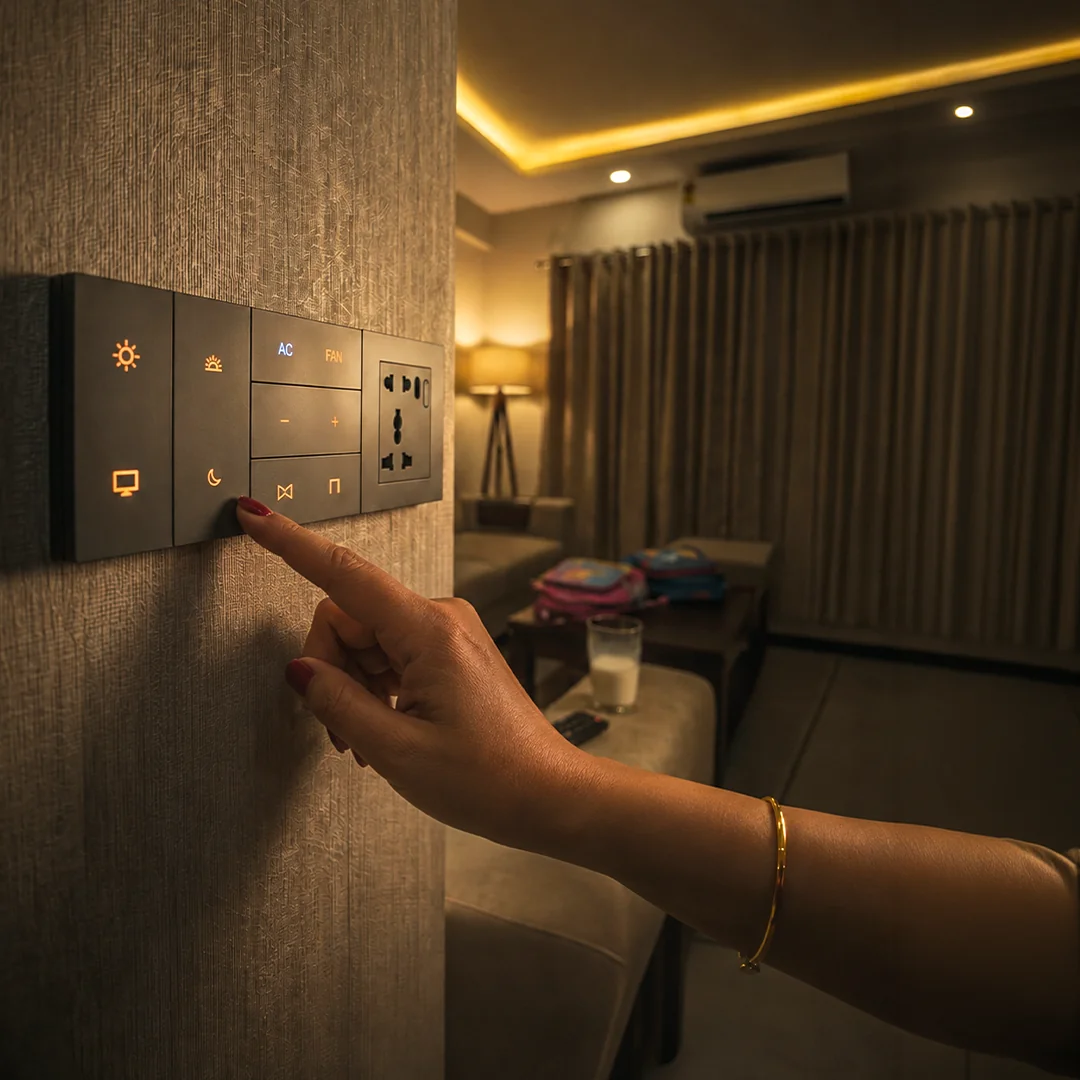
Six ways: the wall keypad, a phone app, voice, sensors, schedules, and scene buttons that move several lights at once. Most homes end up using three or four. The keypad matters most, because it is the only one every person in the house already knows how to use, and the app matters least once the system is set up.
The question sounds like a question about hardware. It is really a question about who lives in your house.
Almost every smart lighting demo, in a showroom or on a product page, is performed on a phone. That is the worst possible advertisement for the thing being sold, because a phone is the slowest way to turn on a light. You have to find the phone, unlock it, find the app, wait for it to connect, and find the room, by which time you could have crossed the room and pressed a switch twice.
The systems that people actually live with happily are the ones where the phone is the fourth or fifth choice. Everything below is organised around that: what each control method is genuinely good at, and which member of your household it is really for.
What are the six ways to control a smart light?
Every smart lighting system on the market is some combination of these. The useful column is the last one, because it tells you what still works on an evening when the internet is down but the power is not, which in Mumbai is a normal evening rather than an emergency.
| Control | What it is genuinely best at | Who in the house uses it | Works with no internet |
|---|---|---|---|
| Wall keypad | Everyday use. Instant, in the right place, needs no explaining | Everyone, including guests, parents and house help | Yes |
| Phone app | Setup, fine tuning, and checking the house from elsewhere | Usually one person, the one who bought the system | On the local network, yes. From outside the house, no |
| Voice | Hands full, lights across the room, lying in bed | Children take to it fastest, elders second | No, this is the one control that genuinely needs the cloud |
| Sensors | Passages, bathrooms, utility areas, the 3am walk | Nobody operates it, which is the point | Yes |
| Schedules | Sunset lighting, morning ramps, holiday presence | Nobody, once set | Yes |
| Scenes | Moving eight lights, the AC and the curtains with one press | Everyone, via a keypad button or a voice phrase | Yes, if the scene lives on a local hub |
That last column splits the market in two more cleanly than price does. A system that keeps its intelligence in the house behaves differently from one that keeps it on a server, and our guide to whether a smart home works without internet goes through exactly which functions fall on which side of that line.
Why does the wall switch still matter most?
Because it is the only control in your home that requires no onboarding. Your mother does not need an account. A guest does not need your Wi-Fi password. The cook does not need to be added to a household group. Everyone who walks in already knows what a switch on a wall does, and any system that quietly removes that ability has made the house harder to live in, not easier.
This is also where the cheapest route to smart lighting has its worst problem. If your smart layer is a Wi-Fi bulb screwed into an ordinary holder, then the wall switch feeding that holder becomes a trap: flipping it off does not just turn the light off, it cuts power to the bulb's radio, so the bulb disappears from the app, drops out of schedules, and cannot be turned back on by voice. The household's correct instinct, to press the switch, is the one action that breaks the system. Most families resolve this by taping the switch in the on position, which is a fair description of the problem.
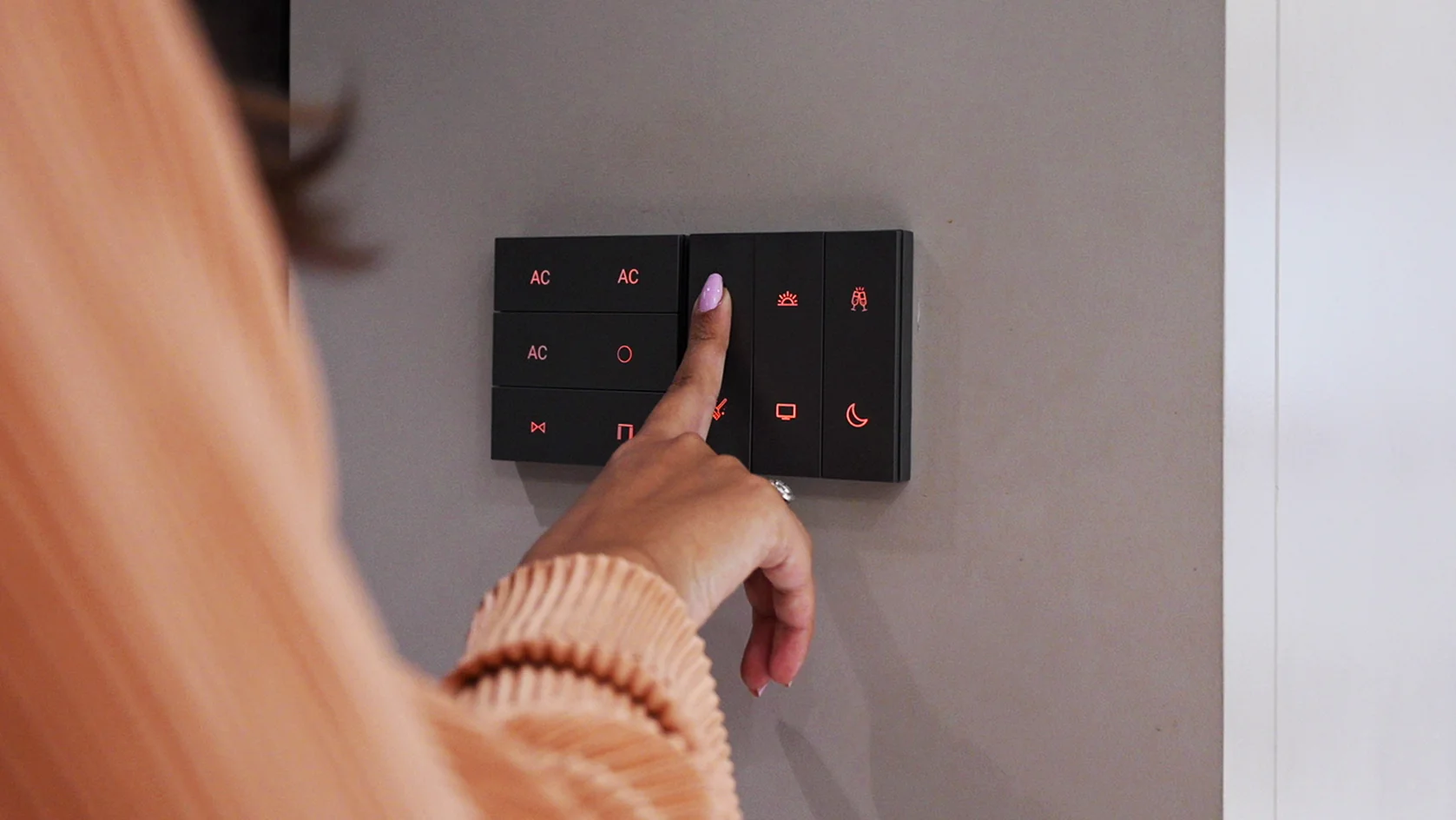
The alternative is to make the wall itself smart, so pressing it is still the right answer. In AHA's case the keypad replaces the existing switch plate and needs a neutral at that switch box, while the dimming intelligence sits in a driver inside each light fitting rather than in the switch box. Our X7 keypad carries three gestures per button, a single press, a double press and a long press, so one physical button can hold a room's normal light, its evening scene and its off state without anybody opening an app.
What is the phone app actually for?
Three things, and daily light switching is not one of them.
Setting the system up and changing it. Naming rooms, building scenes, adjusting how far a sensor reaches, deciding what sunset means in your flat. This is real work and the app is the right tool for it, but it is work you do a handful of times, not every evening.
Checking on the house from somewhere else. Whether you left the balcony light on, whether the flat looks occupied while you are at your hometown. This is the one job nothing else can do, and it is the one that genuinely needs an internet connection at both ends. Our guide to managing a Mumbai home remotely covers the away-from-home side properly.
Reaching the light you did not plan for. Every home has one fitting nobody put a button on. The app is the escape hatch.
If you find yourself opening the app to turn on the living room light every evening, the system has been designed badly. That is a missing keypad button or a missing schedule, not a fact of smart lighting.
Can you control smart lights in Hindi or Hinglish?
Yes, and this is the single most under-used feature in Indian smart homes, because almost every demo is performed in English.
Alexa has taken Hindi and Hinglish commands in India since September 2019. Amazon's own launch announcement used a lighting example to explain it, Alexa, light band kar do, which tells you how the mode is meant to be used: not in formal Hindi, but in the mixed register people actually speak at home. You can switch it by saying Alexa, help me set up Hindi, or from the language setting in the Alexa app. The full announcement is on Amazon's press site.
Google Assistant has supported Hindi on its speakers since 2018, and lets you keep two Assistant languages active at once, so a household does not have to choose between Hindi and English permanently. There is one real limit worth knowing before you promise it to the family: Google's own documentation states you can speak to the Assistant in either language but not a mix of both. So hall ki light on karo, mixed mid-sentence, is exactly what Alexa's Hinglish mode is built for and exactly what Google asks you not to do.
Marathi is not a command language on either. Amazon's supported-language list carries Indian Hindi and does not carry Marathi, so a Marathi-speaking household cannot run its lights in Marathi today. Alexa will recognise Marathi names of places, people and songs inside an otherwise Hindi or English sentence, which is a different and much smaller thing. For a Marathi-first home the honest recommendation is Hinglish commands plus a good physical keypad, not a voice-led design.
Voice control fails in Indian homes far more often over names than over language. Name every light the way your household already refers to it out loud, hall light, pooja light, balcony light, Aai ka room, not by model number or by the room name on the architect's drawing. A command only works if the word in the app is the word the person says.
What happens to your lights when the power comes back?
This is the Mumbai question, and it is a different question from the internet one. Scheduled maintenance shutdowns and the occasional tripping are a normal part of the year here, across all of the city's supply licensees, so it is worth knowing how your lights behave on restore rather than finding out at three in the morning.
Many inexpensive smart bulbs come back on at full brightness. Not because the app misfired, but because the bulb's default behaviour is simply to be on whenever it has power. On a night when supply returns at 3am, every such bulb in the flat lights up at once. Better products let you choose the power-restore behaviour, either staying off or returning to the last state it was in, and that is a setting worth finding deliberately on day one. If you are choosing hardware, this single setting is a fair proxy for how carefully the rest of the product was thought through.
Backing up the lights is only half of it. If you want light during an outage, the lighting circuit has to be on inverter or UPS backup, the same as any ordinary light. The part people miss is the control: if the hub is on an unbacked socket, you get lights with power and nothing left to command them. Put the hub, and the router if you want app access, on backup alongside the lights, or accept that during an outage the keypads are all you have.
Where the intelligence lives decides the rest. An AHA system runs its scenes and schedules on a local hub inside the home rather than in the cloud, so lighting, curtains and scenes keep responding to keypads with the internet down. Voice is the honest exception: assistants are cloud services, so when the line drops, voice stops and the physical buttons carry the house. That is a reasonable trade as long as you knew about it before you designed a bedroom with no switch on the wall.
Worth asking at commissioning, in plain words: what will each room do when power returns at 3am? It is a five-minute configuration conversation and it is much less pleasant to have afterwards.
Which lights should you never control by hand?
The best-designed lighting in a house is the lighting nobody thinks about. Three places earn automatic control outright:
- Passages and stairs. A presence sensor at low brightness after midnight is better than any switch, because the alternative is a full-brightness ceiling light at 3am or a phone torch. This is the single most appreciated automation in homes with elderly parents, which our guide to automation for elderly parents goes into properly.
- Bathrooms and utility areas. Rooms people leave in a hurry with wet hands. Sensor on, timer off.
- Anything tied to sunset. Mumbai's sunset moves relatively little across the year, roughly between six and just past seven, so a sunset-linked rule for the balcony and entrance behaves predictably in a way it would not in a city with long seasonal swings. Set it once against sunset rather than a fixed clock time and it stays correct through the year.
Schedules and scenes are where the same three or four fittings stop being fittings and start being a room that changes character through the day. That is a subject of its own, and our mood lighting guide has the scene recipes, the room-by-room settings and the renter-friendly versions, so this piece does not repeat them.
What decides which of these you can actually have?
Mostly one wire. A traditional Indian switch box often carries only live and switched live, with no neutral, because the switch loop was only ever meant to interrupt power to a fitting, not to run electronics inside the box. Most conventional smart switches need that neutral to stay powered, so its absence is the most common reason a retrofit stalls at the quotation stage.
It is answerable in minutes by an electrician, and it is worth answering before choosing any hardware rather than after. Systems built for Indian retrofits get around it by putting the intelligence in a driver inside the light fitting, where neutral is already present, instead of in the switch plate. Our wired versus wireless comparison covers that architectural split in full, and the timing guide covers when in a fit-out each option is still open to you.
Two smaller constraints decide the rest. Dimming has to be planned with the fitting and its driver, not bolted on afterwards, which is why cove lighting that was never specified as dimmable flickers at the bottom of its range; the cove and false ceiling guide explains that failure properly. And colour temperature control only exists if the fittings you bought support it, a decision made at purchase rather than at the keypad, which warm white versus cool white covers, including why none of this changes your electricity bill.
Where the lights physically go, and how the room is split into circuits in the first place, is upstream of all of it. That is the drawing, and it is in our living room lighting design guide. If you want the commercial overview of what a controlled lighting layer involves, our smart lighting page is the place to start.
What do people ask us next?
What are the ways to control smart lights?
Six, in practice: the wall keypad, a phone app, a voice assistant, motion or presence sensors, time schedules, and scene buttons that move several lights at once. Most homes settle on three or four of them rather than one. The wall keypad matters most, because it is the only control that every person in the house, including guests and house help, already knows how to use without being taught.
Can you control smart lights in Hindi or Hinglish?
Yes. Alexa has accepted Hindi and Hinglish commands in India since September 2019, and Amazon's own launch announcement used a lighting example, Alexa, light band kar do. Google Assistant has supported Hindi on its speakers since 2018. The practical difference is that Alexa's Hinglish mode is built for mixing Hindi and English inside one sentence, while Google's documentation says you may speak either of your two chosen languages but not a mix of both in the same command.
Does Alexa understand Marathi?
Not as a command language. Amazon's supported-language list includes Indian Hindi but not Marathi, so you cannot run a Marathi-speaking household's lights by voice in Marathi today. Alexa does recognise Marathi names of places, songs and people inside an otherwise Hindi or English command. For a Marathi-first home, Hinglish commands and a physical keypad are the realistic combination.
Why do my smart lights turn on by themselves after a power cut?
Because many inexpensive smart bulbs treat being powered as being on, so when mains supply returns at three in the morning the bulb simply lights up at full brightness. It is a hardware default, not a fault in the app. Better products let you choose what happens on power restore, either staying off or returning to the last state, and it is worth setting that deliberately rather than discovering it during the next shutdown.
Do smart lights work during a power cut in Mumbai?
Only if the lighting circuit is on inverter or UPS backup, exactly like an ordinary light. Control adds a second requirement people miss: the hub has to be backed up too, or the lights have power but nothing is left to command them. A common mistake is backing up the lights and leaving the hub and router on the unbacked circuit.
Do you need the internet to control smart lights?
It depends entirely on where the intelligence sits. A system that processes scenes and schedules on a local hub keeps working with the internet down, and only remote access, camera viewing and voice assistants genuinely need a connection. Cloud-first products route even a command sent from the same room through a server on the internet, which is why they stop responding when the line drops.
The short version: design for the keypad first, add voice for the moments your hands are full, let sensors and schedules handle the lights nobody should have to think about, and treat the app as a setup tool rather than a remote control. A house where the phone is the only way in is a house that gets resented by everyone who did not buy the system.
The fastest way to judge any of this is to press the buttons yourself. Both our experience centres are working homes running the system described here, so you can try a keypad, a voice command and a scene on real hardware, and see what happens when we pull the internet. Santacruz West and Lower Parel, open 11am to 7pm (Santacruz West is closed on Tuesdays).
Book a free consultation →