What Should You Plan Behind a TV Unit Before the Carpenter Starts?
Decide four things before the carpenter builds the panel: how high the screen hangs, where the sockets go, a separate conduit for HDMI and network cable, and whether any box will sit behind a solid door. Everything else can change later. These four mean cutting a finished panel.
The panel is the deadline. A TV wall looks like furniture, but it behaves like a wall. Once the carpenter has fixed the panel, laminated it and hung the screen, every socket, cable path and fixing behind it is sealed. The screen, the soundbar and the streaming box can all change in five years. What sits inside the panel usually cannot, without cutting it.
It is easy to design a TV wall as a piece of joinery, a render, a laminate, a floating console, and leave the wiring behind it to be settled on site, on the day the panel goes up. That order is the wrong way round, and it is how a finished TV wall ends up with an extension board inside the unit and a cable running down the front of an expensive laminate.
What has to be decided before the carpenter starts?
Four things, and none of them are about the TV you will buy. They are about the wall the TV will hang on.
- Where the screen hangs, which fixes the height of the socket behind it and the solid fixing the bracket needs.
- Where the power goes, at two heights: behind the screen, and at the console.
- How signal travels, meaning HDMI and network cable in their own conduit, kept apart from power.
- What stays in sight, meaning which boxes have to be reachable by a remote, because infrared does not pass through a solid shutter.
If all four are drawn on the electrical plan before the carpenter arrives, the carpenter builds around them. If they are not, the carpenter builds first and the electrician works around the carpentry, which is how points end up where the joinery happened to leave a gap.
Which parts of a TV wall are fixed, and which can change later?
The one distinction worth carrying into the site meeting: what the wall has to carry is permanent, and what the unit only has to hide is not.
| Item | Decide before the panel? | If you forget |
|---|---|---|
| Screen height and size | Yes. It sets the socket and bracket positions | New holes in a finished panel, and a socket that no longer hides behind the screen |
| Solid fixing for the bracket | Yes. Your carpenter decides what goes behind the panel at the bracket | A bracket fixed into panel alone, which is a call nobody should make after the fact |
| Socket behind the screen | Yes | The TV's own cable runs down the face of the panel |
| Sockets at console height | Yes. Count your devices first | An extension board living inside the unit |
| Conduit for HDMI and network | Yes. Separate from power, with a pull cord | Visible cable, or cutting the panel to add one |
| Network point at the unit | Yes | Streaming over Wi-Fi from wherever the router happens to be |
| Open shelf or closed shutter for the boxes | Yes. It decides whether remotes work | A set-top box your remote cannot see with the door shut |
| The TV, soundbar and streaming box | No. Replaceable any time | Nothing, as long as the points and conduit above exist |
Seven of the eight rows are decisions about the wall. Only the last is about shopping, and it is the only one people usually think about before the carpenter starts.
How high should the TV go, and how big should it be?
Lower than most TV walls put it. THX, the cinema certification company, says that for optimal viewing "you want your line of sight to be more or less aligned with the center of the screen", and suggests "15 degrees or less, above or below the center". It adds a warning for 4K and UHD sets specifically: "If you elevate your TV, you're going to distort the picture quality." Both lines are on THX's page on where and how to position a TV in a living room.
Turned into numbers, which is our arithmetic rather than THX's: 15 degrees from a sofa 8 feet (2.44 m) away allows the screen's centre to sit roughly 65 cm above or below your seated eye level. From 10 feet (3.05 m) it is roughly 82 cm. The practical way to use this is to sit on the sofa you will actually watch from, have someone mark your eye level on the wall with tape, and keep the centre of the screen close to that mark. A TV hung high above a console, the way a mantelpiece TV is, can easily end up outside it.
For size, THX's rule of thumb on what size TV to buy for a living room is to measure the distance from the sofa to the TV in inches and "multiply that number by .835". For a 4K set it runs the arithmetic the other way: divide the screen size by 0.835 for "the ideal maximum gap" between the sofa and the screen.
| Sofa to screen | Screen size the rule points to | Centre within 15 degrees of eye level |
|---|---|---|
| 6 feet (72 inches) | About 60 inches | About 49 cm either side |
| 7 feet (84 inches) | About 70 inches | About 57 cm either side |
| 8 feet (96 inches) | About 80 inches | About 65 cm either side |
| 10 feet (120 inches) | About 100 inches | About 82 cm either side |
The reason this belongs in a wiring article: the screen's height fixes where the socket behind it goes, and the screen's size fixes where the bracket's fixings land. Decide both on the plan, and the carpenter and electrician are working to the same drawing.
How many sockets does a TV wall need?
More than the TV. The honest way to size it is to list every device that will live on that wall and add two for what you will buy later. A typical list looks like this:
- Behind the screen One socket for the TV itself, placed where the screen will cover it, so the TV's cable never shows
- At the console Set-top box, streaming box, soundbar or amplifier, subwoofer, game console, a Wi-Fi access point if one lives here
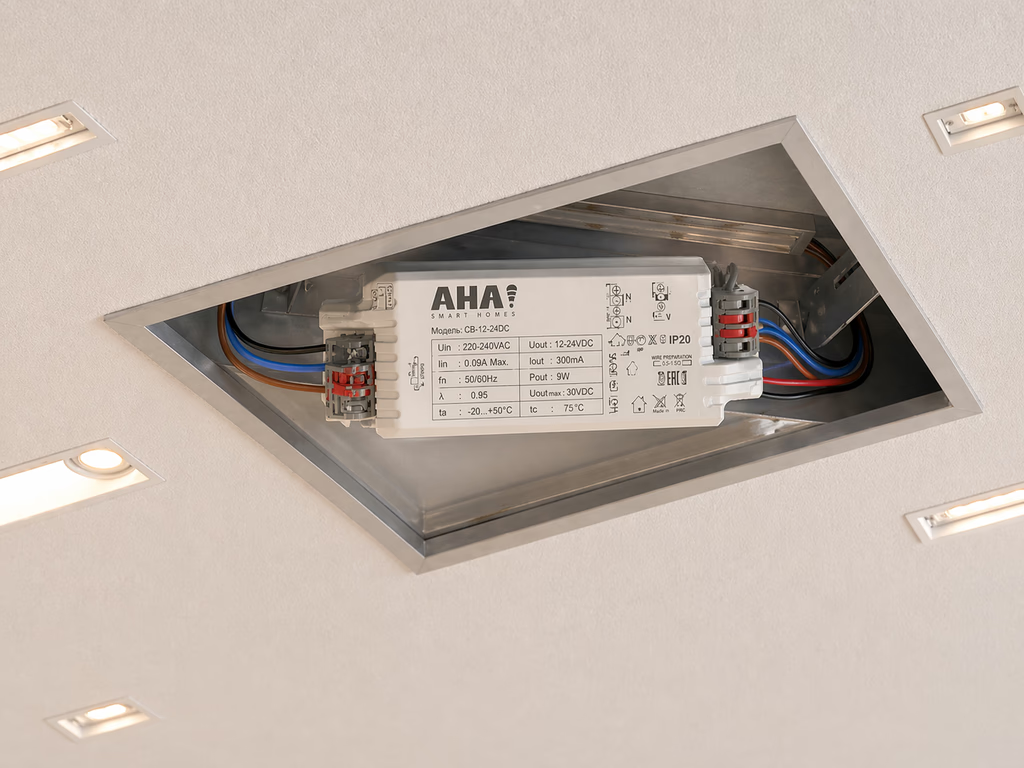
- For the lighting A backlight or under-console strip needs power to its driver, and a strip driver handles up to 15 feet of strip
- For the automation An IR controller needs a power source of its own, in sight of the boxes it controls
Our electrical points checklist for a new home puts TV unit points at 900 to 1,000 mm, behind the console, as widely followed practice rather than a code minimum. The socket for the screen itself is the one that moves with the height decision above, which is why the height has to come first.
Where should the HDMI and network cables run?
In their own conduit, not in the power conduit. The Indian code of practice for wiring, IS 732 (1989 edition), draws a clear line between mains wiring and signal wiring, and it is worth reading the way it is written.
- Two kinds of circuit Section 1 defines a category 1 circuit as one "supplied directly from a mains supply system", and a category 2 circuit as any circuit "for telecommunication (for example, radio, telephone, sound distribution, intruder alarm, bell and call and data transmission circuits)"
- Not in the same conduit Clause 8.5.1.3: category 1 cables "shall not be drawn into the same conduit, duct or ducting as cables of category 2 circuits", unless the latter are insulated for the highest voltage in the category 1 circuits
- Not on the same plate Clause 8.5.1.7: outlets for the two categories "shall not be mounted in or on common boxes, switchplates or blocks". Where that is unavoidable, they must be partitioned by "rigidly fixed screens or barriers"
In practice that means two conduits running from behind the screen down to the console: one for the power points, and one with a pull cord left inside for HDMI and network cable. The pull cord is what makes a future cable a pull rather than a cut, the same advice our checklist gives for spare conduits in ceilings. If you want wired internet at the TV, which is steadier for streaming than a signal passing through Mumbai's concrete walls, the network point belongs on the electrical plan too.
The 1989 edition is the one quoted here, clause by clause; IS 732 was revised again in 2019, so your electrician should work to whichever edition they are certified against.
Should the TV unit be open or closed?
This is the decision that surprises people most, because it looks like a style choice and turns out to be a technical one. Your remote talks to the set-top box in infrared, and infrared needs line of sight. A solid shutter in front of the box stops the remote. It will also stop any IR controller trying to switch that box on as part of a scene.
The test takes two minutes and should happen before the shutters are ordered: put the box where it will live, close the door or front you are considering, and try your own remote from the sofa. If the remote fails, so will anything else that uses infrared. The fix is cheap at design stage and awkward afterwards: an open shelf for the boxes, or a front your remote already works through.
Closed boxes have a second problem, which is heat. Set-top boxes, amplifiers and consoles all give off heat, and a sealed compartment with no airflow cooks them over time. Leave the boxes room to breathe, the same way you would a router cupboard.
Where does home automation come in on a TV wall?
Everywhere the four decisions above touch, which is why it is worth deciding at the same time. What each piece needs from the wall:
- Backlight and under-console strips A strip driver runs up to 15 feet of strip and gives it its own brightness, separate from every other light in the room. It needs power where the strip starts
- TV, set-top box and AC An IR controller sends the same signals their remotes do, and one unit can usually cover several devices in the same room. It needs power and line of sight, which is the open-or-closed decision again
- One button for film night With both in place, Theatre Mode turns the TV on, sets the AC to temperature, shuts the curtains and brings the lights down to mood, in one press
- A keypad beside the sofa The X7 keypad gives each button three presets and carries a USB-C port and an international socket on the same plate. It needs a neutral at its switch box, so ask for one there while the walls are open. Our guide to whether smart switches need a neutral wire explains why
- Sound from the ceiling If you would rather not put speakers on the TV wall at all, AHA's room speakers are a 6.5 inch in-ceiling pair that connects over Wi-Fi or wired network, so they are a ceiling decision, not a panel one
- Who does what Your carpenter builds the unit and your electrician wires it to the plan. Our own technicians then pair, configure and commission the system. We do not build the unit or mount the TV
As a scope estimate, a media or living room with lighting, curtains, universal control and a scene keypad runs around ₹1,50,000 to ₹2,00,000, depending on the number of light points and windows. It is an estimate rather than a quote. How a project like this is planned with your designer and contractor, and handed over, is covered on our page about AHA design and commissioning services, and the entertainment side of it on smart home entertainment.
What does this not solve?
- How much weight your wall can hold. A large TV on a bracket is a structural fixing, and the call on what goes behind the panel belongs to your carpenter and electrician on site, not to a guide.
- Infrared through doors. Line of sight is a physical limit. If a box must sit behind a solid door, it will not respond to a remote or an IR controller with the door shut.
- A keypad with no neutral. If the switch box beside the sofa has no neutral and the wall is already finished, adding one means an electrician's job, and sometimes opening plaster.
- A future bigger screen. If you move up several sizes later, the bracket position and the socket behind the screen may no longer suit it. Plan for the largest screen you can see yourself buying.
- The screen and the boxes. We automate the room around the screen. The TV, soundbar and streaming box are yours to choose, and to change.
If the flat is already finished and the TV wall is built, most of this can still be done without cutting anything, and our guide to home automation without breaking walls sets out exactly which parts. If you are still at possession stage, our new flat possession checklist covers what to check before interiors begin, and home automation before or after interiors covers the timing.
What do people ask us next?
How high should a TV be mounted on the wall?
Low enough that your line of sight from the sofa meets the middle of the screen, or comes within about 15 degrees above or below it, which is the guidance THX gives. The easy test is to sit where you will watch, have someone mark your eye level on the wall, and centre the screen close to that mark rather than high above the console.
What size TV suits the distance from my sofa?
THX's rule of thumb is to measure from the sofa to the TV wall in inches and multiply by 0.835. At 7 feet (84 inches) that points to a screen of about 70 inches, and at 8 feet to about 80 inches. For a 4K set, the same arithmetic run the other way tells you the farthest you should sit.
Can HDMI and power cables run in the same conduit?
They should not. IS 732, the Indian code of practice for wiring installations, keeps mains circuits and data or sound circuits out of the same conduit unless the data cable is insulated for the mains voltage, and keeps their outlets off a shared box or switchplate. Plan one conduit for power and a separate one, with a pull cord, for HDMI and network cable.
Will my remote work if the set-top box is inside a closed cabinet?
Usually not, if the door is solid. Remotes and IR controllers both use infrared, which needs line of sight. Put the box where it will live, close the shutter and try the remote. If it fails, choose an open shelf or a front your remote already works through.
What electrical points does a TV unit need?
A socket behind where the screen will hang so its cable disappears, a cluster at console height for the set-top box, soundbar, streaming box and any lighting driver, a network point, and a conduit linking the two heights. Our electrical points checklist puts TV unit points at 900 to 1,000 mm, behind the console.
Can a TV wall be automated after it is built?
Mostly, yes. An IR controller brings the TV, set-top box and AC into scenes without touching the panel, and a strip light can go on a driver at the fitting. The part that needs planning is a keypad beside the sofa, because an AHA keypad needs a neutral at its switch box.
The short version: before the carpenter starts, fix the screen's height and size, put power at two heights, give HDMI and network their own conduit with a pull cord, and keep every box a remote needs in sight. The TV itself is the one thing on the wall you can change later without a saw.
If you want to see a TV wall with its lighting, curtains and AC on one button before you draw yours, both our experience centres, in Santacruz West and Lower Parel, are open 11am to 7pm (Santacruz West is closed on Tuesdays). Walk in, or book ahead and bring your electrical plan.
Book a free consultation →